Your proffessional time Table software

Involve your teacher colleagues- and all will benefit

Proffessional solution for timetable planners and students


  ATS logo1

Timetabling experts recommend Untis the Professional Timetable Software for colleges, schools and universities

Creating the timetable and keeping it up to date is a time consuming challenge in most schools. 10 day cycles, blocked sessions and a multitude of (time-) constraints further increase the complexity of this task. Reduced teacher availabilities and room shortages complicate the task of the timetablers even more. And once the timetable is completed, it has to be kept up to date: cover teachers may have to be found for sick colleagues, students and teachers have to be informed of cancellations or room changes and statistical information may have to be passed on to the authorities. Untis can help you with all of these tasks with tailor made tools.
hide

Untis Express,

Limited features for a school that wants to create their simple timetable the most cost effective way.
Your school timetable can be designed and optimised in less than an hour. Easy to use wizard with simple basic steps to ensure your timetable meets your school requirements
hide

Untis

The all-powerful timetable engine that will solve the most complexed of timetable situations.
Flexible and can be adapted to primary, secondary, professional, college, university. Untis will help you to distribute the teaching duties, to manage replacement scheduling, to edit your timetables on the Web, and much more.
hide

Web Untis

WebUntis Info makes the complete timetable of your school accessible at any time - via the internet. The upload of the timetable
data only takes a couple of seconds and all of your teachers and even the students instantly have the up to date information in their
personal calendars – even on their mobile devices.


Watch a short video clip below


Watch Untis Express video


Watch Untis video


Watch Web Untis video


Version 2026

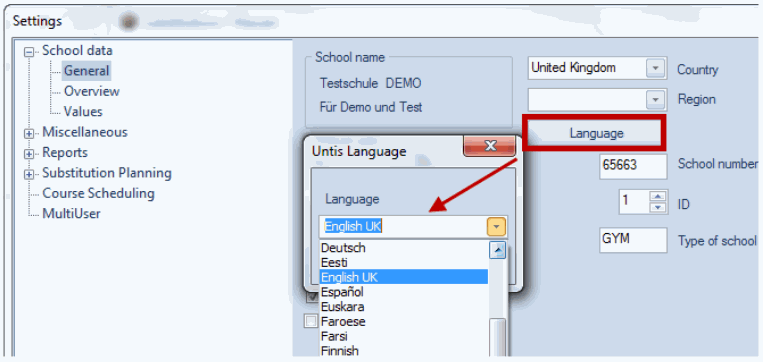
Welcome to the latest release of Untis – Version 2026! This update introduces a wide range of enhancements designed to streamline your timetabling experience and improve overall performance.

Key Highlights

  • Modernized User Interface
    Enjoy a refreshed design with smoother navigation and improved usability.
  • Advanced Student Import Preview
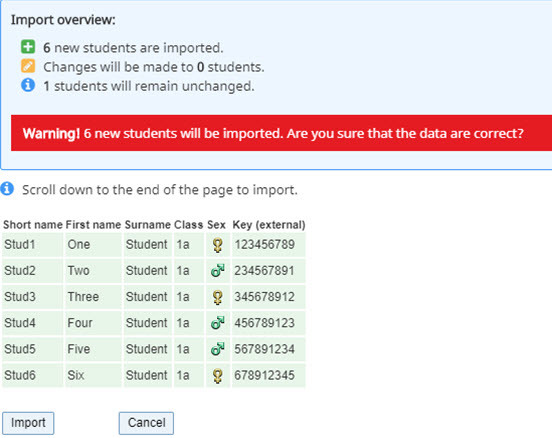
    Easily preview changes when importing student data via CSV or Sokrates. Warnings are triggered if more than 50% of students are new, helping prevent accidental bulk imports.
  • Improved Handling of Existing Students
    View detailed differences in class membership and import data, including date-based changes and character set validation.
  • Enhanced Course Planning
    A powerful new optimization algorithm improves scheduling accuracy and efficiency.
  • 64-bit System Support
    Fully compatible with Windows 11 and future operating systems.
  • Improved Substitution Planning
    Streamlined workflows for managing teacher substitutions and event creation.
  • Better Integration with WebUntis
    Enhanced data exchange, including conflict detection and resolution.


 New student import Preview   Changes to existing students Preview
 Newstudent    importexting
 One of the standout features in Untis 2026 is the enhanced Student Import Preview. This tool gives administrators a clear overview of changes when importing student data via CSV or Sokrates.If the import includes more than 50% new students (relative to the total number of existing and new students), the system will display a red warning message along with a confirmation dialog. This helps prevent accidental bulk imports and ensures that large-scale changes are intentional    Untis 2026, importing changes to existing student records is now more transparent and reliable. The enhanced preview feature displays all differences clearly before finalizing the import.When modifying class memberships, the system shows the exact date when the new class assignment will take effect. This helps administrators plan transitions accurately and avoid scheduling conflicts.

     
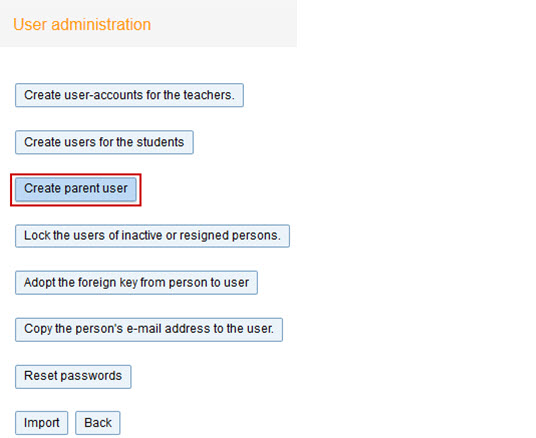
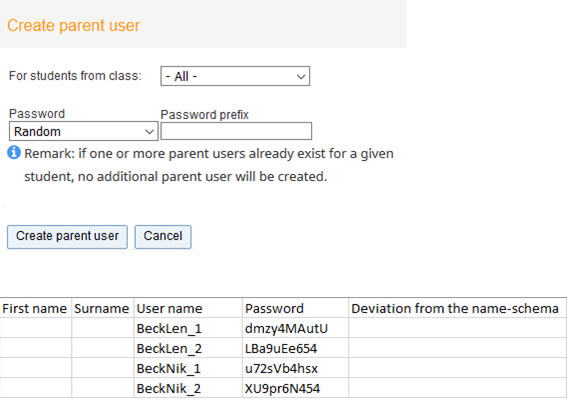
 Administration: Create 2 parent-users   Create Parent User
     
 CreateparentuserTt is now possible to automatically create two parent users for every student without importing addresses. Often parent’s e-mail-addresses are unknown and it is a big effort to create parent-users manually.
That’s why we introduced a new feature to automatically create 2 parent-users for each student with a few clicks.
We just add _1 and _2 at the end of the student’s username.
   parentuserOur timetable-edtior got a facelift. With the new features you can now add or remove fields with drag&drop. And you can zoom in to see all the details. NB. This function doesn’t know, if a parent user should be assigned to more than one student.
In this case the parents would have to login with different usernames for each student.
  
 Comparison Mode   Change teacher in timetable
     

 image

One of the major innovations in Untis 2026 is the newly designed Comparison Mode, located under the Start tab. To activate it, simply click the Comparison Mode button.


 image2

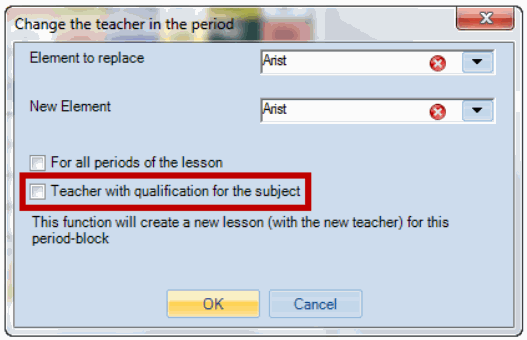
In the 2026 version it was already possible to 'Change the teacher in the period' by clicking right on the respective period. What is new is the possibility to filter the listed teachers by those who have the teaching qualification for the respective subject (prerequisite: Lesson planning module).

     
 Add A teacher in a TimeTable   Change teacher in timetable
     

 image3

Like the 'Change teacher' function already available in earlier versions, Untis 2026 now offers a more flexible way to add a teacher to an existing period (or to all periods of a lesson). Simply right-click on the desired period in the timetable and select the updated option from the context menu.


Our timetable-edtior got a facelift. With the new features you can now add or remove fields with drag&drop. And you can zoom in to see all the details.


 Enter Exam Via a right click


Untis 2026 introduces a streamlined way to schedule exams directly from the timetable interface. With the new right-click functionality, administrators and planners can quickly assign exams to specific periods without navigating away from the timetable view. This feature improves workflow efficiency by allowing: Direct exam entry via right-click on a timetable period Automatic linking of exams to subjects and teachers Conflict detection to avoid overlapping exams By integrating exam scheduling into the timetable editor, Untis 2026 simplifies planning and ensures better coordination across departments.


 History Mode


The new history mode enables you to conveniently compare several school years without having to enter new license data. The history mode is active with the module 'Lesson planning'.